GPU Resource Planning for Self-Hosted Agents
Only the LLM and embedding layers need GPU resources; the other three run fine on CPU.
Most GPU sizing guides ask one question: how big is your model? That question is incomplete, and building a self-hosted agent stack off that single question is how teams end up with a very expensive GPU sitting there doing nothing useful. The model is one piece of five. Skipping the other four causes the budget to fall apart somewhere around month two, usually right after someone asks why the vector database needs a high-end GPU built for heavy compute.
Roughly a third of organizations building agents today are already self-hosting, according to LangChain's 2026 State of Agent Engineering report. The reasons aren't mysterious: cost at high volume, data residency rules, and regulatory limits in industries where sending customer data to a third-party API is a compliance headache nobody wants. That shift matters for planning. Self-hosting used to be a budget call, something a startup did to save money. Now it's increasingly a control call, driven by concerns about data residency and compliance rather than cost alone. Sizing mistakes get more expensive under that model, not less, because the alternative isn't "switch back to the API," it's "explain to compliance why the deployment is delayed another quarter."
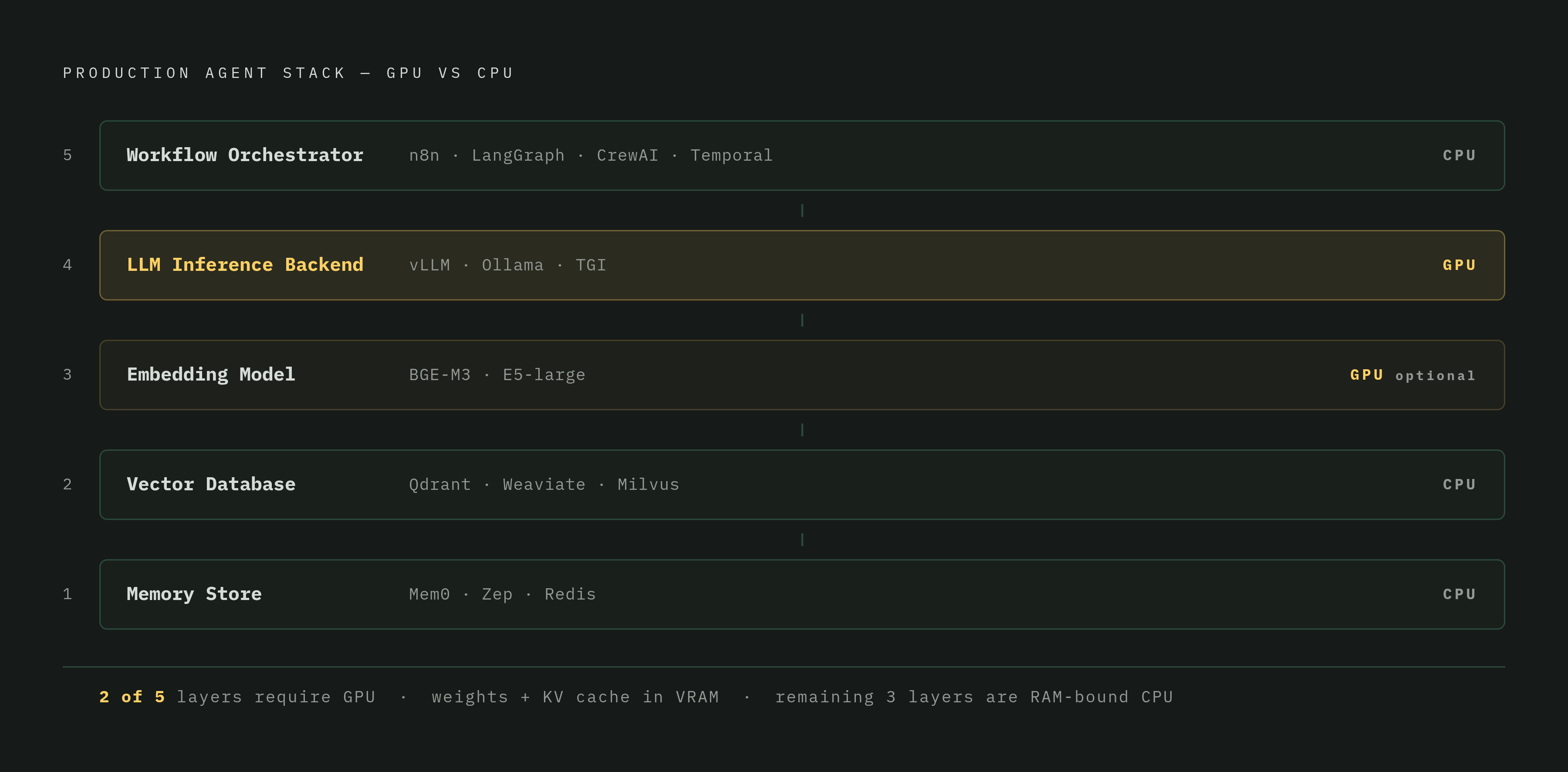
A production agent stack has five layers, and each one behaves differently under load: the workflow orchestrator, the LLM inference backend, the embedding model, the vector database, and the memory store. Treating those five as one line item labeled "GPU" is where the planning breaks.
What needs a GPU in an agent stack
The breakdown, layer by layer, is shorter than most people expect.
The workflow orchestrator (n8n, LangGraph, CrewAI, Temporal) needs no GPU at all. It's running control-flow logic and firing off HTTP calls. n8n's own documented minimum is 2 CPU cores and 2 GB of RAM, and that's genuinely all it takes.
The LLM inference backend (vLLM, Ollama, TGI) is the one layer that has to live on GPU. Model weights and the KV cache both need to sit in VRAM for the agent to respond fast enough to feel real-time. Everyone thinks of this layer when they hear "GPU planning," and it deserves that attention, just not all of it.
The embedding model (one open-source embedding model, another similar model, or anything served through a dedicated inference server) benefits from a GPU but doesn't demand one the way the LLM does. Turning text into vectors is just a forward pass through a network, and the VRAM footprint is a fraction of what the LLM needs.
The vector database (Qdrant, Weaviate, Milvus) runs on CPU for serving queries. Qdrant's documentation says outright that the engine relies "primarily on CPU acceleration for scalability and efficiency." FAISS is the one exception, with native GPU-accelerated search, but that's the exception, not the rule.
The memory store (Mem0, Zep, Redis-backed session state) is CPU territory too, full stop.
So two layers out of five actually need a GPU. Renting an H100 to run Qdrant or to host LangGraph's orchestration logic is like buying a forklift to carry a briefcase. It'll work. It's also a waste of money that appears on next month's cloud bill and nowhere else.
This matters more for agents than for chatbots, because agents don't answer once and stop. They reason, plan, and execute across multiple steps, and a five-step agent loop running at 200ms time-to-first-token has to have every one of those five layers pulling its weight in the right place. That's why the rest of this piece focuses on the two GPU-bearing layers, the LLM backend and the embedding model, for all the VRAM math ahead.
Why agents consume far more VRAM, the KV cache problem
Chatbots and agents look similar from the outside. Under the hood, they're not close. An agent carries forward its system instructions, its tool schemas, whatever documents it retrieved, and every step of the task so far, every single time it loops. A chat exchange that runs 2,000 tokens can balloon into 100,000 tokens once it's wrapped in an agent loop doing multi-step work.
The KV cache scales linearly with that growth. Every concurrent session pays that cost on its own, independently, so ten agents running at once isn't ten times the compute, it's ten separate KV caches all competing for the same VRAM pool.
Model size matters more here too. A 7B model tuned for fluent chat answers can fall apart the moment it has to plan five steps ahead and keep track of what it already tried. Models in the 14B-and-up range handle multi-step reasoning meaningfully better, and for an agent that's not a nice-to-have. It gets the task done instead of leaving the agent looping forever on the same failed tool call.
Latency stacks up differently, too. A single chatbot reply either lands fast or it doesn't. An agent's latency compounds across every step in the loop. Memory bandwidth, how fast data moves in and out of VRAM, ends up mattering just as much as how much VRAM there is in the first place.
The VRAM formula for a full agent stack, weights, KV cache, embeddings, and overhead
The full formula: total VRAM needed equals LLM weights, plus KV cache, plus roughly 15% overhead for the inference runtime itself.
Weight sizing depends on precision. At FP16, the math is params in billions times 2, in gigabytes. A 70B model needs 70 times 2, or 140 GB, for weights alone. With AWQ INT4 quantization, that same 70B model drops to 70 times 0.5, or 35 GB. As a rough rule of thumb, figure about 0.5 GB per billion parameters at INT4.
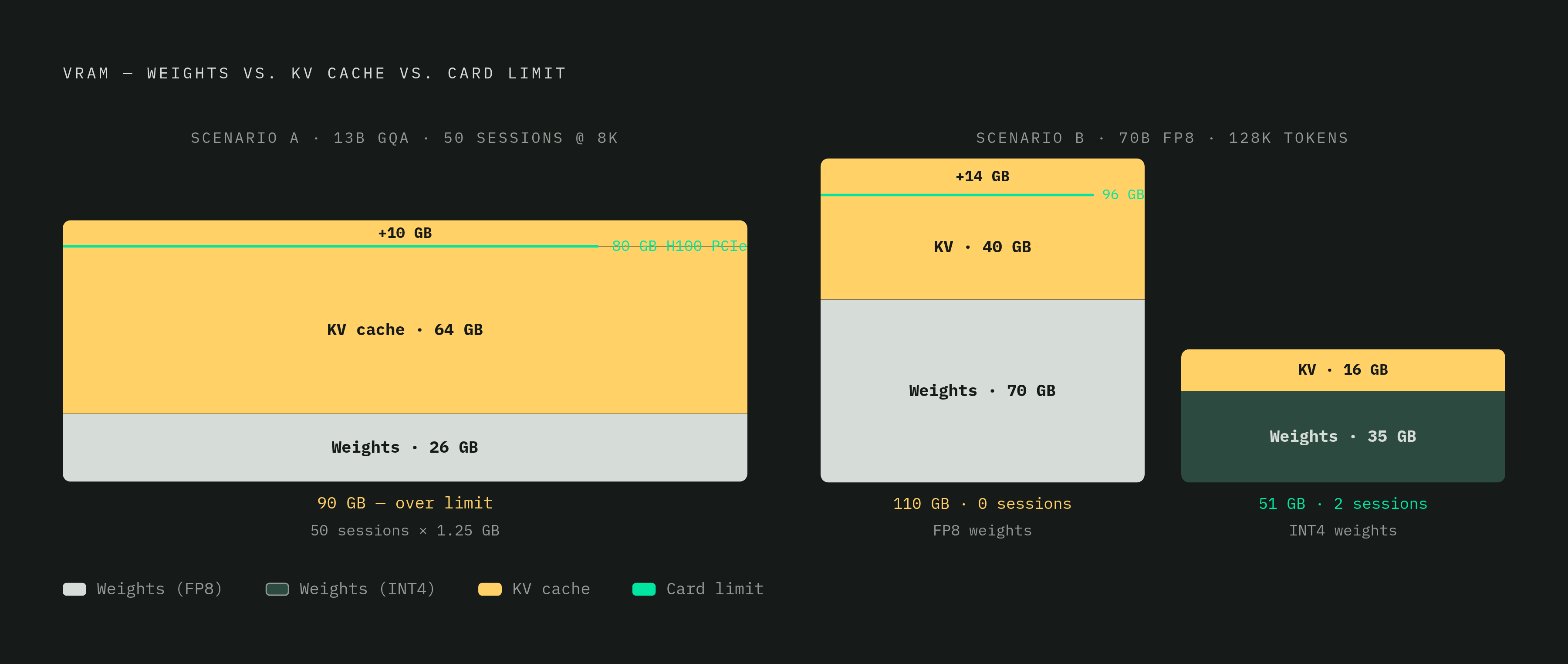
KV cache is the number that catches people off guard. Take a 13B model using an attention method built for efficient serving, serving 50 concurrent sessions at 8K context each. That setup needs around 90 GB total: 26 GB for weights, plus roughly 64 GB of KV cache, at about 1.25 GB per session. That's already past what a single H100 PCIe card offers at 80 GB, which pushes the requirement up to an H200 with 141 GB of HBM3e memory.
In long-context territory, the numbers get uglier. A 70B model at FP8 runs around 70 GB for weights plus 15% overhead, and if sessions run at 128K tokens, that adds another 40 GB of KV cache on top. On a single 96 GB GPU, that leaves zero room for even one concurrent long-context session. Drop to INT4 weights with FP8 KV cache and two sessions fit. Two. On a 96 GB card. That's the gap between what marketing slides imply and what actually happens on the hardware.
Embedding models deserve their own line item in a generic buffer. Something like BGE-M3, with a relatively modest parameter count, fits comfortably within a small GPU's VRAM budget. Larger embedding models in the 7B-to-8B parameter range carry a meaningful VRAM footprint at higher precisions, which isn't trivial if that model is sharing a 24 GB card with an LLM. Budget it separately. Folding it into "overhead" is how a 24 GB card that looked fine on paper suddenly runs out of room in production.
CPU sizing for the orchestration and memory layers that GPU guides ignore
Orchestration lives on the CPU, and it's easy to forget that once all the attention goes to VRAM math. Tool routing, sub-agent coordination, checking whether a task actually finished, none of that touches the GPU.
The ratio between general-purpose processing capacity and accelerator capacity that used to work for simpler LLM deployments, something like 1:8, is shifting toward something closer to 1:1 or 1.4:1 as agentic workloads get more complex. In practical terms, that's somewhere around 86 to 120 CPU cores paired with the GPU capacity described above. That's a big jump, and it reflects a real trend: orchestration overhead grows faster than raw LLM compute as agents get more complicated. Multi-agent hierarchies, long chains of tool calls, retry logic when something fails, all of it counts on the CPU side of the ledger.
Memory stores like Redis, Mem0, and Zep handle session state and conversation history, workloads that are bound by RAM capacity rather than GPU compute. Session state and conversation history are what constrain these systems, so the sizing factor here isn't "how many GPU cores" at all. It's how much RAM the conversation history needs to sit in without falling over.
GPU hardware tiers and the agent configurations each tier supports
Match the tier to what the VRAM formula actually spits out, not to whatever number is on the marketing page.
At the entry tier, something like an RTX 4060 with 8 GB of GDDR6 can accommodate smaller models at aggressive quantization levels like INT4 or Q4, where the 0.5 GB-per-billion-parameter rule keeps weights within budget. It cannot fit a 7B model at FP16, which needs around 14 GB on its own and leaves no room for KV cache. That card is fine for local testing and development. It is not fine for production agent serving, and there's no meaningful headroom left over for KV cache once concurrency enters the picture.
A mid-range consumer card like the RTX 4090 with 24 GB of GDDR6X opens up models in the 7B-to-13B range, where FP16 weight sizes run roughly 14 to 26 GB, for development work and small teams. NVIDIA's GeForce license terms technically prohibit using GeForce cards in data centers for production serving. Teams that need to stay compliant and still want that VRAM tier look at something like the L40S, which is 48 GB and carries enterprise certification for production inference.
At the high end of consumer hardware, the RTX 5090 with 32 GB of GDDR7 provides enough headroom for models in the 14B range at FP16, where weights alone run around 28 GB, leaving some room for KV cache at moderate context lengths. That combination lands in a genuinely useful spot: strong planning quality for agent workloads, without stepping up to full datacenter pricing.
Inference serving engines and the features that matter specifically for agent workloads
vLLM has become the default choice for serving production LLM inference, and its current release line runs on the V1 engine, which became the default option in 2025. A handful of features in engines like this matter specifically because of how agents behave.
Prefix caching is probably the single biggest cost saver available for agent workloads. Every loop iteration, an agent resends the same long system prompt and the same tool schemas. Prefix caching lets the serving engine recognize that shared chunk of text and skip recomputing it every single time. For a five-step agent loop, that's not a marginal optimization, that's paying for the prompt once instead of five times.
Speculative decoding works differently: a smaller draft model proposes a batch of tokens, and the main model checks them in bulk rather than generating one token at a time from scratch. It cuts latency without touching output quality, and it matters more for agents than chatbots because inter-token latency compounds across every step of the loop instead of showing up just once.
Paged attention, the core idea behind vLLM's design, manages the KV cache in non-contiguous blocks of memory instead of one long contiguous chunk. That eliminates the fragmentation that used to cap how many concurrent sessions a GPU could serve, and it's a direct answer to the concurrency math laid out earlier: it's the reason 50 sessions at 8K context is a number the hardware can actually serve.
Multi-Agent Architectures and Orchestration Patterns That Multiply the VRAM Budget
Different orchestration patterns place very different demands on the VRAM budget, and the pattern chosen changes the math from every section above.
A single agent running one model against one KV cache is the simple case, the one the formula above describes directly. Add a supervisor pattern, where one orchestrating agent delegates to several sub-agents; the sub-agents may share a model and a KV cache pool, or they may each need their own, depending on whether they run sequentially or in parallel. Concurrency is what drives the VRAM number up here: five sub-agents running at once look, from a VRAM standpoint, a lot like five separate concurrent sessions on the inference backend, each with its own slice of KV cache to pay for.
The planning question isn't just "how big is the model." It's how many of these agents run at the same time, how long their context windows run, and whether the orchestration pattern lets sessions share cache or forces each one to carry its own. Get that wrong, and the GPU that looked generously sized for one agent turns out to be short by half once five of them start running together.