Extending Agents with Custom Tools and Plugins
Well-designed tools matter more than raw model power for building agents that work in production.
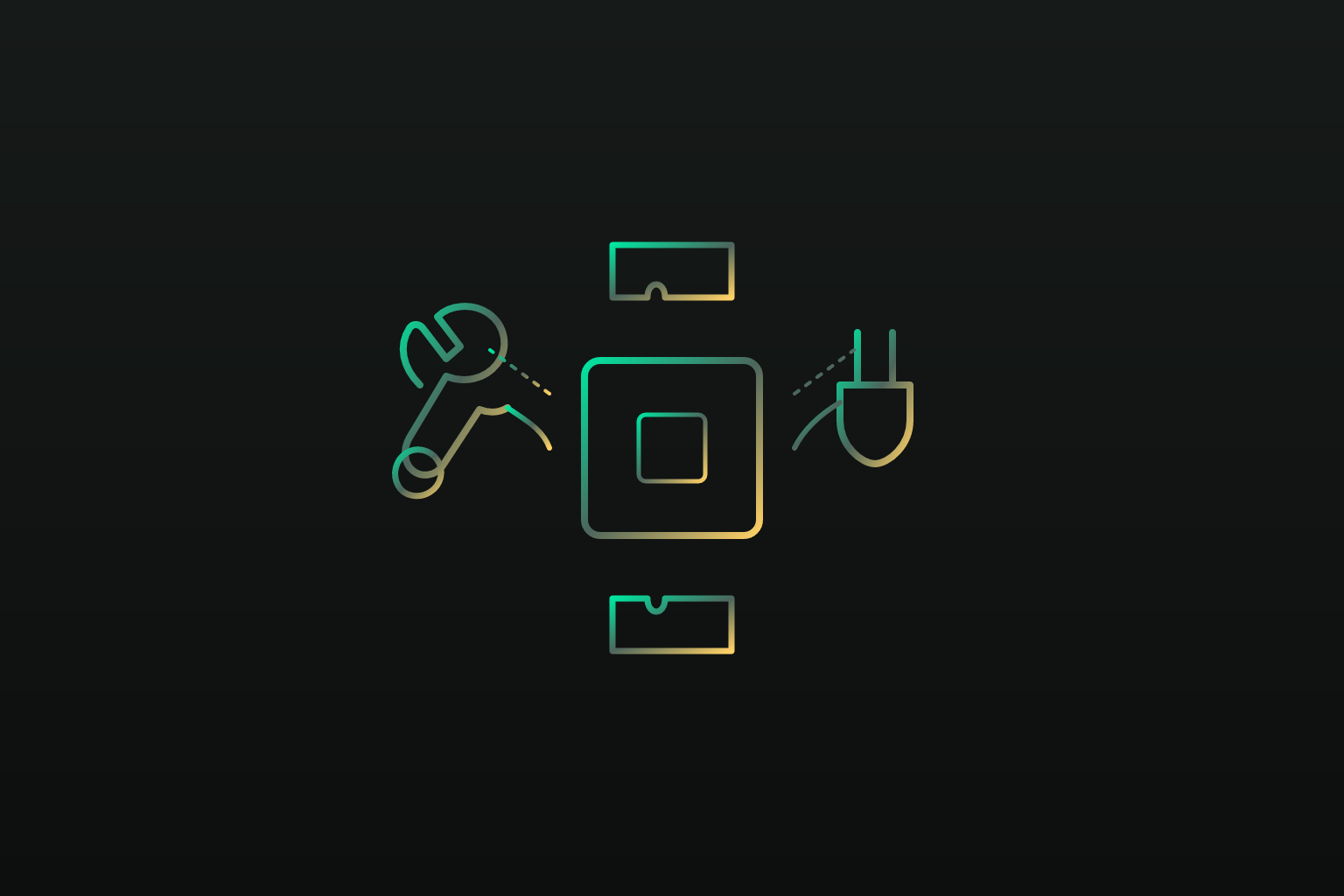
Most people think a smarter model makes a smarter agent. That's only half the story, and it's the easier half. The actual determinant of whether an agent does anything useful is the layer nobody talks about at dinner parties: the tools it can reach, and whether those tools are built well enough for the model to use them correctly.
An LLM by itself is a very well-read brain in a jar. It can reason, summarize, argue both sides of a debate, and write you a sonnet about your quarterly earnings. What it cannot do is post that sonnet to Slack. Give it a tool that lets it call the Slack API, and suddenly the brain in the jar can act on the world instead of just describing it. That gap between reasoning and doing is where skills and plugins come in: a skill tells the agent what it should do, and a tool or plugin gives it the means to actually go do it. Confuse the two, and you end up with a demo that looks great on a slide and falls apart the moment someone asks it to actually send the email. It's a bit like hiring a brilliant consultant who can draft the perfect memo but has no idea how to work the office printer.
The stakes here are not small. Enterprise adoption of agent-based systems is now the norm rather than the exception, with well over 90% of large organizations experimenting in some form. But the share that has moved past pilot mode into real production use sits far lower, under 25% by most counts, and the reason usually traces back to two things: data silos and governance gaps. Both of those are, at bottom, tool-wiring problems. Getting an agent to reach the right systems, safely and predictably, is the unglamorous work that separates a company running agents at scale from one still watching a chatbot fumble through a support queue.
How function calling works: the mechanism underneath every tool integration
Function calling is a fairly simple loop. The model gets a prompt plus a catalog of tools it's allowed to use. It decides whether a tool is needed, and if so, it emits a structured call: a tool name and a set of typed arguments, formatted the way the catalog expects. That call goes to a runtime, which executes it. The result comes back to the model, and the model keeps reasoning from there.
The catalog itself is usually described with JSON Schema: name, description, parameter types, which fields are required and which aren't. The description field does more work than people expect. The model reads that text to decide when a tool should fire at all, so a vague description ("handles user stuff") produces vague behavior. A precise one ("looks up a customer's order status by order ID; does not cancel or modify orders") produces precise behavior, or at least gives the model a fighting chance.
There's a difference between single-turn and multi-turn calling. Single-turn is one call, one result, one response, done. Multi-turn, sometimes called agentic behavior, is the model chaining several calls together, feeding the output of one into the input of the next, adjusting its plan as new information comes in. This is where things get genuinely hard. The Berkeley Function Calling Leaderboard highlights that multi-step agentic behavior remains genuinely hard, even for the best-performing models on the board. Some tasks parallelize nicely, three API calls fired off at once because they don't depend on each other. Others have to run in strict sequence because step B needs the output of step A before it can do anything.
One thing worth sitting with: the model itself never touches a server. It doesn't run code, it doesn't make an HTTP request, it doesn't have hands. It emits intent in a structured format, and something else, the runtime, carries that intent out into the world. That distinction matters more than it sounds like it should, because it means every security check, every log, every governance rule gets enforced at the execution layer, not inside the model's head. You can't ask the model to behave; you have to build the fence around where it acts.
Designing a tool that an agent will actually use correctly
A good tool does one thing. Just one. The single-responsibility principle that software engineers have been preaching for decades applies here with extra force, because the "user" reading your tool's documentation is a language model deciding, in real time, whether to use it.
Name tools like actions, not categories. search_documents and submit_expense tell the model exactly what happens when it calls them. process_request or handle_data tell it nothing, and a model faced with ambiguity will guess, and guesses in production systems tend to cost money or embarrassment.
The description is where the real design work happens, and it needs to be written for the model, not for the human skimming a wiki page later. State when the tool should be called, not only what it does. State what it explicitly does not do, because that's what stops the model from reaching for submit_expense when what it actually needed was update_expense. If the difference between a valid and invalid input isn't obvious from the parameter name alone, spell it out.
Schema choices matter just as much:
- Keep required fields to the bare minimum; every optional field the model has to guess at is another chance for it to guess wrong.
- Use enums for anything with a fixed set of valid values instead of letting the model free-type a string and hope for a match.
- Return structured output, not a paragraph of prose, because the model has to parse that result to keep reasoning, and prose is a lot harder to parse reliably than JSON.
Idempotency deserves its own line of thought. A tool that reads data can be retried freely; nothing breaks if the model calls it twice by accident. A tool that writes, posts, or charges a card needs to be built so a duplicate call doesn't double-charge someone or send the same Slack message four times. There's an old story, maybe apocryphal, about an early e-commerce bot that retried a failed "charge card" call three times because the confirmation was slow to arrive; the card was charged three times, the customer was furious, and the postmortem fit in one sentence: nobody had asked what happens if this runs twice. And when something goes wrong, the shape of the error matters. A tool that returns a clear, typed error, something like {"error": "invalid_date_range"}, gives the model a chance to recover and try again with corrected input. A tool that just throws an opaque 500 stops the reasoning loop cold. Well-designed tools are one of the few levers a builder actually controls to close that gap, since you can't reach into the model and improve its reasoning, but you can absolutely make its job easier.
MCP as the connective tissue between agents and tool ecosystems
Without a shared protocol, every agent needs a custom integration for every tool it touches. With N agents and M tools, that's N times M separate wiring jobs, each one a little bespoke nightmare that breaks the moment either side changes its API.
The Model Context Protocol, or MCP, exists to collapse that math. Anthropic released it as an open standard in November 2024, and governance passed to the Linux Foundation in December 2025, which is usually the sign a technology has outgrown its original sponsor and become genuine infrastructure. MCP defines how agents discover and call tools through a server and client model: a server exposes a set of capabilities, a client (the agent's runtime) talks to it using a shared format, and neither side needs to know the other's internal plumbing. Think of it as a universal power outlet: the appliance doesn't need to know how the electricity was generated, it just needs the plug to fit.
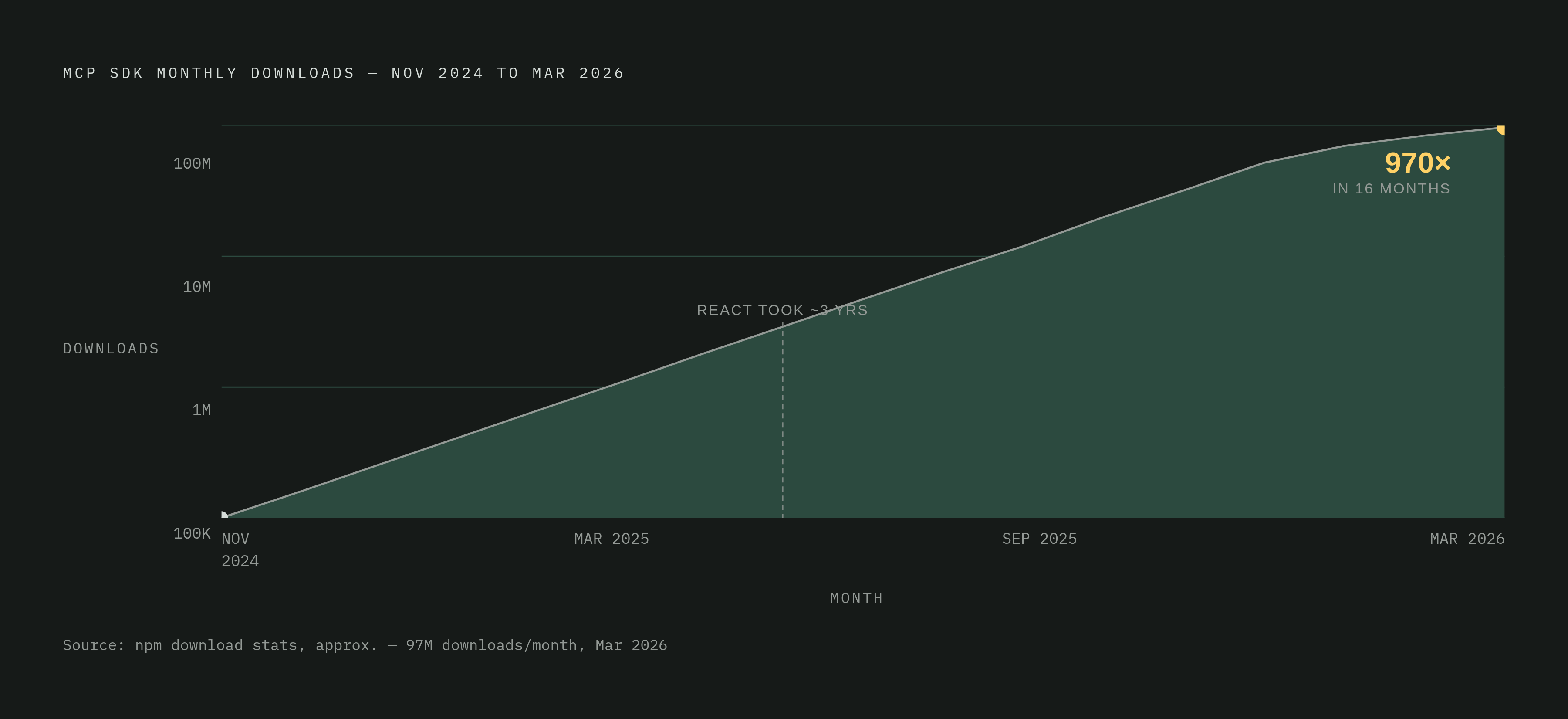
The adoption curve is the real story here. MCP's SDK pulled in roughly 100,000 downloads in its first month. By March 2026, monthly downloads had climbed to around 97 million, a 970x increase in eighteen months. For a sense of scale, the React npm package took about three years to reach comparable monthly download volume; MCP got there in sixteen months. By May 2026, the ecosystem counted more than 10,000 active public MCP servers, with 9,652 latest server records sitting in the official registry and nearly 16,000 GitHub repositories tagged with the mcp-server topic.
The tool categories tell you where the early money and attention went. Developer tools, mostly AI coding assistants, lead with over 1,200 servers. Business application servers, covering customer service, sales automation, and internal operations tooling, follow close behind with 950-plus. And the vendor list stopped being an Anthropic-only affair a while back: OpenAI adopted MCP in March 2025, Microsoft in July 2025, AWS in November 2025. A 2026 survey from Stacklok found 41% of software organizations already running MCP servers in limited or broad production. That's real, load-bearing infrastructure at this point.
What MCP doesn't do is just as important. It doesn't solve discovery within your own organization (which of the ten servers your team can reach should this agent actually use?). It doesn't handle security review before something goes live. It doesn't make routing decisions when an agent has fifteen servers to choose from. Those are architecture problems that sit one layer up, and they're covered later in this piece.
Skills and agent plugins: the packaging layer above the protocol
An MCP server running on one developer's laptop is a neat trick. It is not, on its own, something an organization can roll out to five hundred employees, version properly, and yank back if it starts misbehaving. That gap, between "it works on my machine" and "it's a governed capability," is what skills and plugins are built to close.
Anthropic introduced Agent Skills in October 2025: folders containing instructions, scripts, and resources that an agent loads on demand. The format is plain markdown, no binaries, no compile step, no runtime dependency to install. That's a deliberately low bar to clear. But a skill only defines what the agent should do; if that skill needs to reach an outside service, it still needs a connected tool or MCP server sitting underneath it to actually make the call.
Agent Plugins 1.0, a cross-provider standard that arrived in August 2026, packages skills and MCP servers together into one portable format. Build a plugin once and it runs across ChatGPT, Codex, Copilot, and VS Code, which is a real improvement over rebuilding the same integration five times for five environments. Google's Agents CLI follows a similar logic, bundling expert skills for building, evaluating, deploying, and observing agents into a package any compatible coding agent can load.
The portability story has holes in it still. Tools built for a handful of other coding assistants and IDE plugins run on their own customization systems, ones that haven't adopted the shared format yet. A plugin built for one of those stays put; it doesn't travel. Practical guidance for anyone building custom tools right now: design toward the shared standard wherever it's available, and keep clear documentation of which capabilities are portable and which are locked to a specific environment. Nobody wants to discover that mid-migration.
How enterprise distribution and admin control of plugins actually works
Picture the plugin equivalent of an app store, except the admin decides what's on the shelf. An admin maintains a central repository, usually on GitHub, listing every plugin that's been approved for use. Employees get prompted to install relevant ones when they open a project that could use them, rather than hunting around for tools on their own.
That repository typically supports four states for any given plugin. Available means an employee can opt in if they want it. Installed by default means it's just there unless someone actively removes it. Required means it can't be removed, full stop. Hidden means it's invisible to the general employee population entirely, usually reserved for staging environments or restricted teams still testing something risky.
Skip this kind of controlled distribution and you get chaos with a friendly face: different agents across the company reaching different services, inconsistent behavior nobody can quite explain, and audit trails with holes in them right where you need detail most. Version pinning matters here too. Plugins sitting in the central registry should be locked to specific versions; letting them auto-update from an outside source without review is basically leaving the back door open and hoping nobody walks through it.
Pinterest's internal architecture is a useful real-world reference point for what mature governance looks like. Domain-specific MCP servers handle data platforms like Presto and Spark, alongside a general-purpose knowledge server. A central registry handles discovery. High-risk operations require human approval before they execute. And every server, before it ever touches production, passes through security, legal, privacy, and generative AI compliance review. The payoff: roughly 66,000 monthly tool invocations across 844 active users, saving an estimated 7,000 hours of manual work each month. The review process there isn't red tape slowing things down; it's the exact infrastructure that lets the organization run tools at that volume without someone waking up to a very bad Monday.
Registering and routing tools inside an orchestration framework
Framework choice shapes how tools get defined, attached to an agent, and picked at runtime, and the differences between frameworks are bigger than people expect going in.
LangChain has a large built-in tool ecosystem and a consistent pattern (decorators, classes) for adding custom ones, which makes it a solid fit when the tool catalog is big and varied. LangGraph builds on that same tool stack but adds explicit graph-based routing, useful when the logic for picking a tool branches or depends on conditions rather than being a straight shot. CrewAI assigns tools per role within a crew of agents, configured through YAML or Python, which gives fine control when different agents on a team need genuinely different capabilities. Microsoft's Agent Framework, announced in October 2025 as the unified successor to AutoGen and Semantic Kernel, brings session-based state, middleware, telemetry, and type safety, along with graph-based workflows for tracing exactly how a multi-agent task executed, which matters a lot in environments that need to prove what happened after the fact. Google's ADK and OpenAI's Agents SDK both integrate tightly with their own model and tool ecosystems, worth a look if the rest of the stack already lives there.
Model-agnostic, open-source platforms take a different approach: bring your own model, connect your own tools, without getting locked into one vendor's catalog or execution environment. That flexibility matters for teams running agents continuously on their own infrastructure rather than renting someone else's.
Routing is the part that trips people up once the tool count climbs. With a handful of tools, description-based matching (the model just reads what's available and picks) works fine. With dozens, you need explicit routing rules or tags and categories layered on top, or the model starts making slower, worse choices simply because it's drowning in options — a diner handed a thirty-page menu takes longer to order, and orders worse, than one handed five good choices. A few antipatterns show up constantly: registering every tool to every agent, which dilutes the signal and adds latency for no benefit; reusing the same tool name across different implementations in a multi-agent system, which causes routing collisions that are miserable to debug; and building no fallback for when a tool errors out, so the agent just stalls instead of trying something else. The tech stack underneath all of this, in a typical 2025-2026 build, spans an LLM, a framework, vector stores for retrieval, tool-calling APIs, a backend runtime (Python and FastAPI show up constantly), and observability tooling like Langfuse or OpenTelemetry. Tools sit in the middle of that stack, and they only work as well as the layers above and below them.
Evaluating whether your tools are actually working
A tool that passes its own unit tests can still fail badly in production, and the failure usually isn't the tool's fault. It's the model calling it from the wrong context, passing an argument of the wrong type, or chaining it into a sequence that never should have happened. Isolated testing tells you the tool works; it says little about whether the agent will use it correctly.
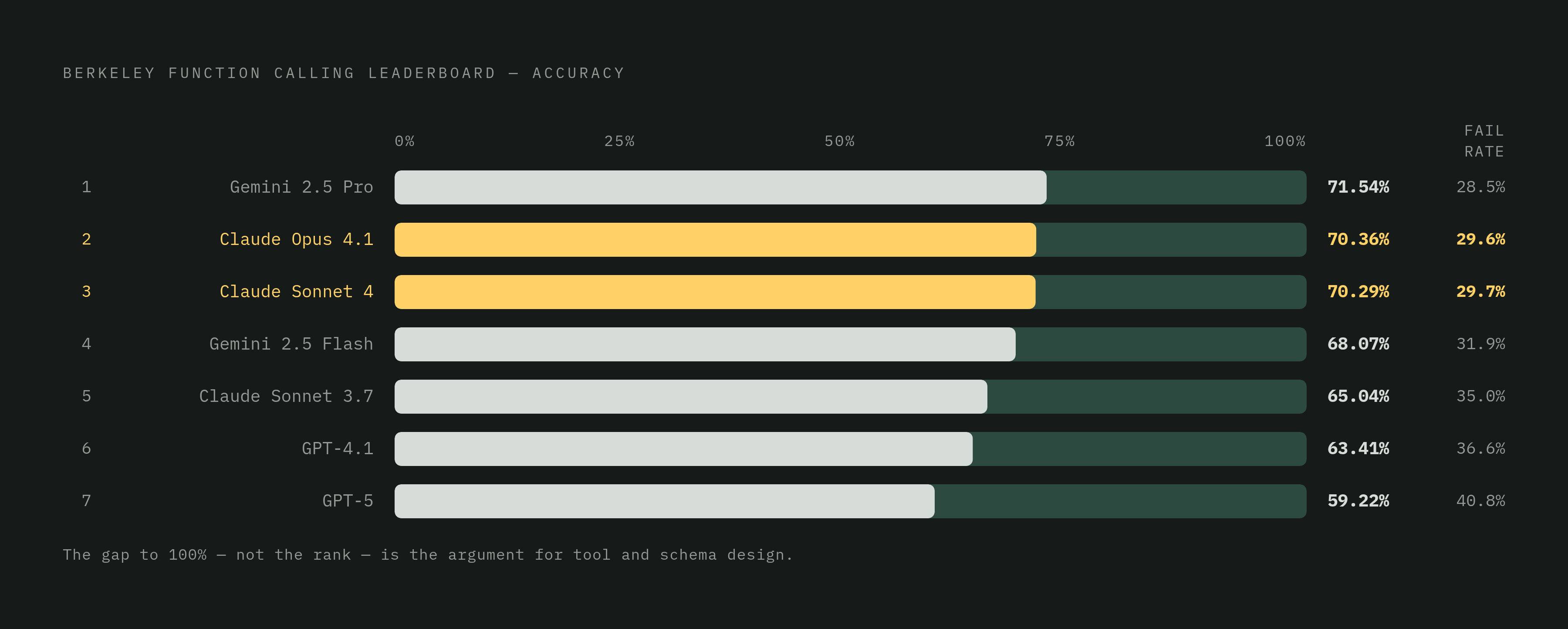
BFCL, published at ICML 2025, is the closest thing this space has to a standard benchmark. It measures serial and parallel function calls across several programming languages, uses Abstract Syntax Tree evaluation so it can scale to thousands of functions at once, and separately scores single-turn accuracy against multi-turn, agentic behavior. The numbers are worth knowing if only as a reality check: Claude Opus 4.1 ranks second at 70.36%, Claude Sonnet 4 ranks third at 70.29%, and GPT-5 comes in seventh at 59.22%. Even the top performers leave a lot of room on the table, which is the entire argument for why tool and schema design matter. Model selection is a lever you only partly control; how well you build your tools, by contrast, is fully in your hands.
A few other evaluations round out the picture. ToolQA tests question-answering over external data sources, relevant if the tools in question are mostly retrieval-based. API-Bank checks API selection accuracy across hundreds of real-world APIs, useful when the catalog is large and sprawling. Gorilla focuses narrowly on whether the model generates a correct API call in the first place, schema accuracy in its purest form.
None of that replaces watching production numbers directly. Track tool call success rate, whether the call executed without error. Track argument validity rate, whether the model passed values that were actually in range and correctly typed. Track tool selection accuracy, whether it picked the right tool for the job at all. And for anything multi-step, track chain completion rate: how often the whole sequence finishes rather than stalling three calls in. Observability platforms like Langfuse, OpenTelemetry, and PromptLayer log every call with its inputs and outputs, which turns a mysterious failure into a diagnosable one. That difference, mysterious versus diagnosable, is basically the whole ballgame once an agent is live and something inevitably goes sideways.
The security surface that opens when agents can call tools
Every tool an agent can call is a door somebody built into the system, and doors work both ways. The moment an agent can execute code, hit an API, or write to a database, it carries reach as a piece of software, and reach needs a fence around it.
The obvious risks are the ones baked into the sections above: a tool with no idempotency check that gets called twice and charges a customer twice, a tool with a vague description that gets invoked for the wrong task, a plugin installed without version pinning that quietly changes behavior after an upstream update nobody reviewed. Layer onto that the standard concerns of any system that executes instructions derived from user input, malicious or malformed prompts that try to trick the model into calling a tool it shouldn't, arguments crafted to slip past validation, or chains of calls that individually look fine but add up to something nobody approved.
A better model doesn't solve any of this on its own. Pinterest's approach is closer to the actual fix: a registry that knows what's deployed, review gates before anything reaches production, human approval sitting in front of the operations that can actually cause damage, and logging detailed enough that when something does go wrong, there's a trail to follow instead of a shrug. The tool layer is where an agent's actions carry real consequences, not just conversation. Treat it that way from the start, and the "governance gap" that keeps three-quarters of enterprise pilots stuck in limbo stops being a mystery and starts being a checklist.